ClickHouse on Cloudflare R2: object storage as the truth, NVMe as the cache
Every table part on our object-storage node is an object in a bucket. The box holds a 2.5 TB cache, about a gigabyte of metadata and a Keeper, and until a second replica joins it is the only path to the data. Here are the three disk layers, the table definitions, what the nightly backup saves and what it skips, and how ClickHouse Cloud does the same thing behind an engine it does not release.
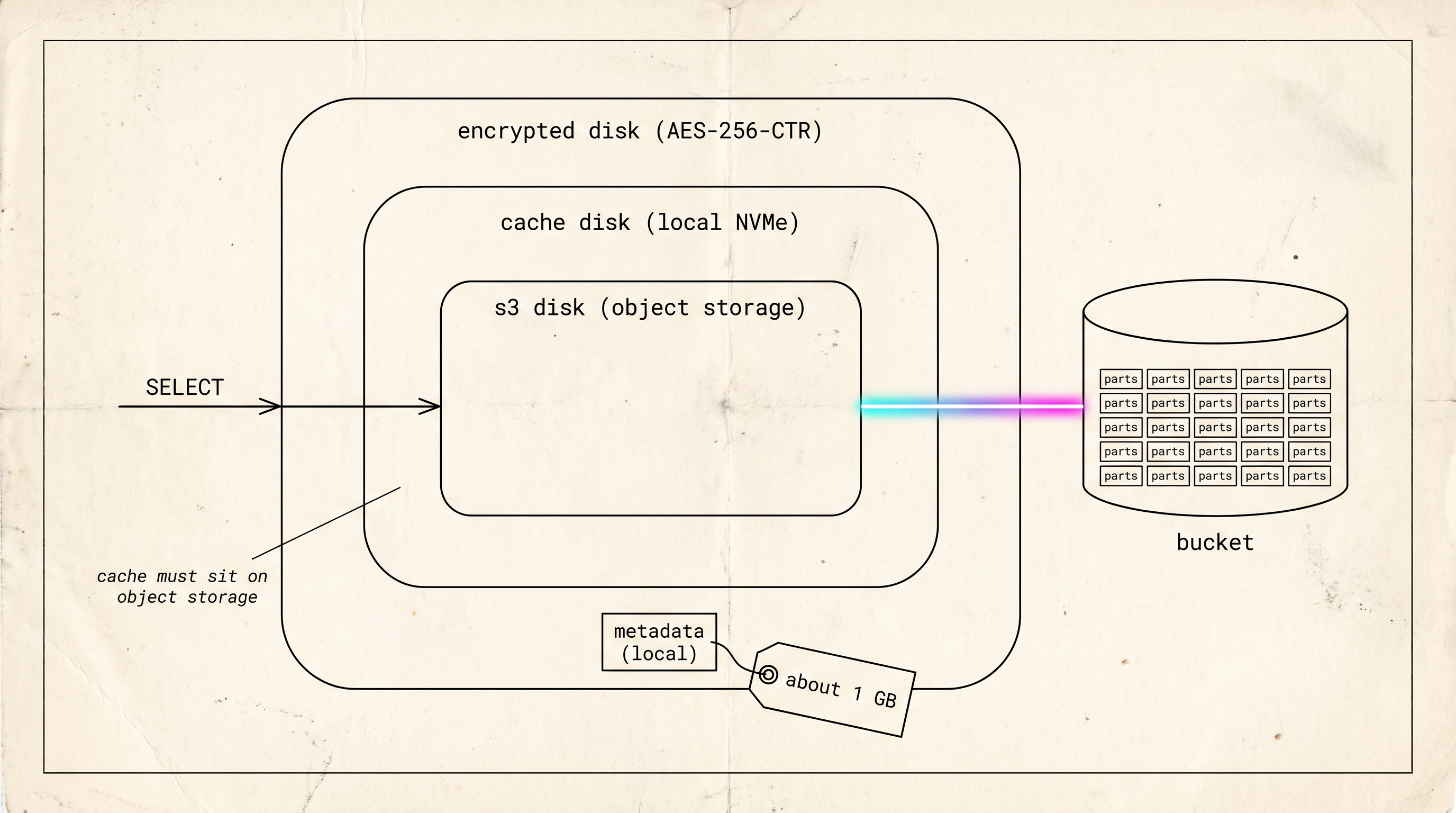
Every part of every intent table on our object-storage node is an object in a Cloudflare R2 bucket. The server that answers queries against them holds a 2.5 TB cache, about a gigabyte of metadata, a local disk for temporary files and system tables, and a single-node Keeper. No table data exists only on that server.
The server runs graph8’s intent pipeline: a visitor feed, crawled pages and a keyword resolver. Ingest arrives daily, and queries range from 50 millisecond lookups to scans over tens of gigabytes. The box has 32 threads, two NVMe drives and a 1 Gbit port, and its data has lived in the bucket since July. The configuration below is what was on the node on 2026-09-07.
The three disk layers
ClickHouse lets one disk wrap another, and on this server three are stacked.
The bottom layer is s3_main, a disk of type s3 that points at a prefix in the bucket. Its metadata_path is a local directory, /var/lib/clickhouse/disks/s3_main/. A part in the bucket is a set of objects with opaque names, and the small local file that maps the part to its objects is the only thing that makes them readable.
The middle layer is s3_cached, a disk of type cache over s3_main. It’s a directory on the NVMe with a max_size of 2.5 TB. We turn on cache_on_write_operations so a part written by an insert or a merge is in the cache before anyone queries it, and we raise max_file_segment_size from its default of 8 MiB to 128 MiB so a miss fetches a large slice of a part in one round trip.
The top layer is s3_enc, a disk of type encrypted over s3_cached, using AES-256-CTR. We didn’t choose this order. We wanted the encryption underneath the cache, so the cache would hold plaintext, and ClickHouse refused with “cached disk is allowed only on top of object storage”. With encryption on top, the cache and the bucket both hold ciphertext and every read decrypts. CTR mode supports random access, so a read of one column range decrypts only that range.
The storage policy is called s3_cached whether or not encryption is on, and its one volume points at s3_enc or, without encryption, at s3_cached. Tables reference the policy, never a disk, so turning encryption on changed no table definition.
A ClickHouse table is stored as parts, and a disk is where the parts live. Our three disks nest inside each other. The innermost talks to the bucket, which keeps every part. The middle one keeps recently used parts on the local drive, so the second read of anything comes back fast. The outer one encrypts everything, so neither the drive nor the bucket ever holds readable data.
The bucket side of the storage configuration, with account, bucket and credentials blanked out, goes in config.d/.
<clickhouse>
  <storage_configuration>
    <disks>
      <s3_main>
        <type>s3</type>
        <endpoint>https://ACCOUNT.r2.cloudflarestorage.com/BUCKET/HOST/</endpoint>
        <access_key_id>R2_ACCESS_KEY_ID</access_key_id>
        <secret_access_key>R2_SECRET_ACCESS_KEY</secret_access_key>
        <region>auto</region>
        <support_batch_delete>false</support_batch_delete>
        <metadata_path>/var/lib/clickhouse/disks/s3_main/</metadata_path>
        <s3_min_upload_part_size>134217728</s3_min_upload_part_size>
        <s3_max_single_part_upload_size>67108864</s3_max_single_part_upload_size>
        <s3_strict_upload_part_size>134217728</s3_strict_upload_part_size>
        <s3_upload_part_size_multiply_factor>1</s3_upload_part_size_multiply_factor>
      </s3_main>
      <s3_cached>
        <type>cache</type>
        <disk>s3_main</disk>
        <path>/var/lib/clickhouse/s3_cache/</path>
        <max_size>2500000000000</max_size>
        <cache_on_write_operations>1</cache_on_write_operations>
        <max_file_segment_size>134217728</max_file_segment_size>
      </s3_cached>
      <s3_enc>
        <type>encrypted</type>
        <disk>s3_cached</disk>
        <algorithm>AES_256_CTR</algorithm>
        <key_hex>DISK_KEY_HEX</key_hex>
      </s3_enc>
    </disks>
    <policies>
      <s3_cached>
        <volumes><main><disk>s3_enc</disk></main></volumes>
      </s3_cached>
    </policies>
  </storage_configuration>
  <merge_tree>
    <storage_policy>local_fast</storage_policy>
  </merge_tree>
</clickhouse>
The four upload settings at the end of s3_main exist because R2 rejects a multipart upload whose parts differ in size, so every non-trailing part is forced to exactly 128 MiB. The s3_ prefix on those names is not optional. ClickHouse reads the per-disk upload settings only under the prefixed names, and our own template carried the unprefixed forms for two of them until this review caught it, which means the values it intended were not the values in force. The merge_tree block makes local_fast, a plain NVMe disk defined in a companion file, the default policy for any table that doesn’t name one. A data table opts into the bucket by naming s3_cached.
The table definitions
SHOW CREATE on the node on 2026-09-07 shows the same shape for every data table: a Replicated MergeTree engine on an explicit Keeper path, SETTINGS storage_policy = 's3_cached', daily partitions, and a TTL of 90 days on the signals tables and 180 days on crawled pages.
Daily partitions let expiry drop a whole partition’s parts, which is a delete rather than a rewrite. They also mean more parts, and on object storage every merge that reduces the part count is a set of metered uploads, so we cap how large a merge may grow and how many run at once.
What stays on local disk
With local_fast as the default policy, the system tables and any table without a policy stay on the NVMe. Temporary files for sorts and aggregations go to tmp_path, a local directory unless you point it elsewhere. Our first configuration had the default policy on the bucket, so every table that hadn’t named one, system tables included, was writing metered objects for nothing.
The keyword resolver’s hot tables are pinned to local disk too. A 50 millisecond lookup can’t absorb a round trip to the bucket on a miss, and its working set is small enough to fit.
Bucket location, lifecycle rules and the cache path
R2 fixes a bucket’s location when the bucket is created. Cloudflare’s data location page (updated 2026-08-19) says a location hint is honored only the first time a bucket with that name is created, and that a jurisdiction can’t be changed afterwards. Cloudflare added a us jurisdiction on 2026-08-17. A bucket far from the compute makes every cache miss cross that distance, and the only fix is a new bucket and a copy. Check the location before the first part is written.
A lifecycle rule on the bucket will break tables. ClickHouse’s guide says a rule “could lead to broken tables”, because expiry on the bucket never consults the local metadata that still references the objects. The only rule that belongs there is the default one R2 puts on every bucket, which expires multipart uploads seven days after they start.
Our cache directory and the local_fast disk share one encrypted volume of 3.4 TiB, so without a guard they compete for the same free space. The guard is keep_free_space_bytes on the local disk, set to 500 GiB, so local tables stop growing while the volume still has that much free. With the cache at its 2.5 TB ceiling, that leaves about 700 GB for the local tables.
Durability and availability
The bucket makes the data durable. It doesn’t make the service available.
If we lose the server, the parts are still in the bucket. Queries stop, because the local metadata, the cache and the single-node Keeper all live on that server. To get the service back we’d rebuild, restoring the metadata and pointing a fresh machine at the bucket (the restore drill times that), or fail over to a second replica that’s already serving. We don’t have a second replica yet, so the server is a single point of failure for availability. It isn’t one for the data.
Replicated tables record every part in Keeper, so Keeper adds a write to the ingest path, and if it’s lost every table goes read-only. We accepted that because a Replicated engine lets a second replica join a live table. With zero-copy replication off, the new replica fetches the parts it’s missing from this server over the network and writes its own copies to its own bucket. In return, Keeper’s state is one more thing to back up.
Durable means the data still exists after something breaks. Available means you can query it right now. The bucket gives us the first. For the second we need a running machine, and today we have one, so a failure would pause the signals rather than lose them.
Encryption and the key
The data drive is LUKS2, unlocked at boot by clevis against Tang servers on our own network, so a drive pulled from the server is unreadable. That volume holds the cache, the metadata, the local disk and the Keeper state.
s3_enc applies AES-256-CTR to every object before it leaves the server, so Cloudflare only ever holds ciphertext. The key is a hex string that lives in our secret store and is rendered into storage.xml when the playbook runs, and those are its only two copies. Lose the key and every object in the bucket is unreadable. We plan to escrow a copy with a second holder and haven’t done it.
The metadata backup
A nightly job syncs three directories to a prefix in the same bucket: disks/s3_main, the part-to-object map, and store and metadata, the table definitions. We keep fourteen days. The whole backup is about a gigabyte because it holds no table data. The data exists once, in the bucket, and we haven’t made a second copy of the objects.
The job leaves out two things. Keeper’s state is what makes a Replicated table writable, so a restore without it brings the tables up read-only. The users are created by SQL and live in the server’s access directory, so a fresh server comes up with the default user and nobody else. Both are on our gap list.
How ClickHouse Cloud does it
ClickHouse Cloud runs the same shape, object storage under a cache, with three things we lack.
In “No more disks” (ClickHouse blog, Tom Schreiber, 2025-07-09), compute nodes store nothing locally. SharedMergeTree keeps part metadata in Keeper rather than on each server, and the docs call it “a cloud-native replacement of the ReplicatedMergeTree engines”. Our local disks/s3_main directory is the component they removed.
Their cache is shared. “Building a distributed cache for S3” (ClickHouse blog, 2025-05-28) describes eight dedicated cache nodes per availability zone, reached in 100 to 250 microseconds against about 500 milliseconds from S3, so a new node is warm as soon as it joins. Ours is a directory on one drive and goes away with the server.
The engine stays inside their cloud. Alex Zaitsev’s RFC 54644 (2023-09-14) asked for the open-source path to be fixed, was closed as not planned, and records why: “ClickHouse Inc. made their own solution to this with the SharedMergeTree storage engine, which is not going to be released in open source.”
We run the layout the vendor documents and warns about. The checklist article lists the warnings, with a fix for each.
The first node on this layout
Our first server on this layout had the same design on paper. We reverted its Replicated engines within a day because Keeper was taking a write per part with no second replica to justify it, and after that every convenient decision landed on the local disk, until a later runbook described the server as local-only in practice. The configuration at the time allowed both modes on one host, and the template we render now allows one.
Checking a node
Run these as a user that can read the system database.
SELECT name, is_encrypted, cache_path FROM system.disks
WHERE name LIKE 's3%' ORDER BY name;

-- ┌─name──────┬─is_encrypted─┬─cache_path────────────────────┐
-- │ s3_cached │            0 │ /var/lib/clickhouse/s3_cache/ │
-- │ s3_enc    │            1 │ /var/lib/clickhouse/s3_cache/ │
-- │ s3_main   │            0 │                               │
-- └───────────┴──────────────┴───────────────────────────────┘

SELECT policy_name, volume_name, disks FROM system.storage_policies
WHERE policy_name = 's3_cached';

-- ┌─policy_name─┬─volume_name─┬─disks──────┐
-- │ s3_cached   │ main        │ ['s3_enc'] │
-- └─────────────┴─────────────┴────────────┘
The encrypted disk reports the cache path of the disk beneath it, so two rows carry the same path. If the policy’s disk is s3_cached rather than s3_enc, encryption is off and the bucket holds plaintext. If cache_path shares a filesystem with a local disk, check that disk for keep_free_space_bytes.
Still open
We can’t yet say what share of reads the 2.5 TB cache serves, because system.filesystem_cache and the S3 read counters in system.events sit behind a grant our reporting user doesn’t have. We expect the decryption overhead above the cache to be small and haven’t measured it. The second replica has no date yet.
Further reading
- No more disks, Tom Schreiber, ClickHouse blog, 2025-07-09.
- Building a distributed cache for S3, Tom Schreiber, ClickHouse blog, 2025-05-28.
- SharedMergeTree, ClickHouse Cloud docs.
- RFC: MergeTree over S3 improvements, Alex Zaitsev, 2023-09-14.
- Separation of storage and compute, ClickHouse docs.
- External disks for storing data, ClickHouse docs.
- Data location, Cloudflare R2 docs, updated 2026-08-19.
Keep the durable copy of the data in the bucket and the fast copy in the cache.