Why we stopped buying storage and compute together
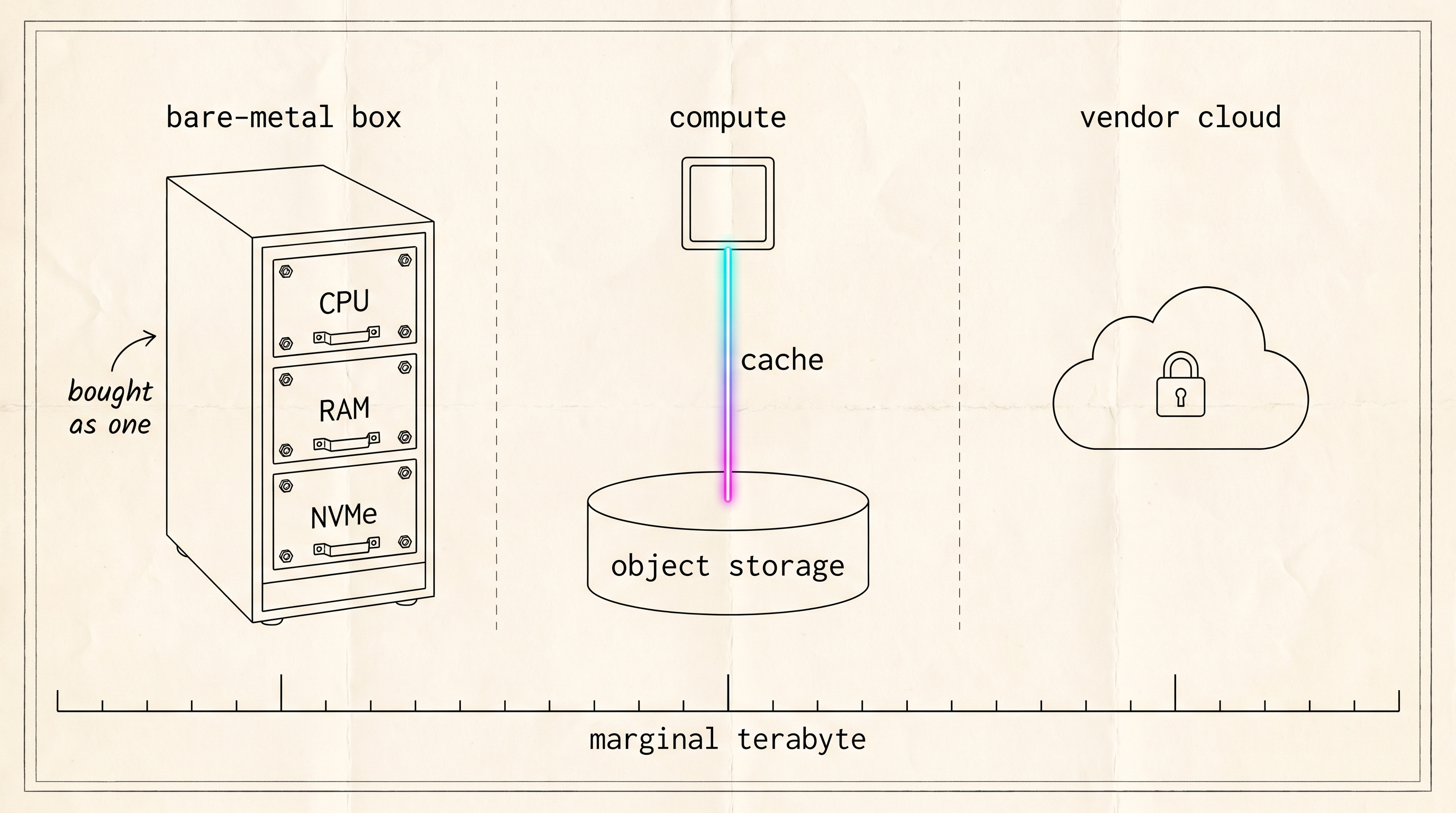
On a bare-metal server, the size of the dataset picks the catalog row, and the row comes with CPU and RAM you did not ask for. We priced a terabyte three ways, in public list prices, and stopped buying storage and compute as one unit.
One of our ClickHouse servers has 48 threads and 1.5 TB of RAM. We sampled it twice on 2026-09-07 and both times the threads were between 97 and 99 percent busy while about 80 percent of the RAM sat unused and the data disks were roughly a third full.
There is nothing wrong with the machine. We bought it that way because the dataset had to fit on the disks, and on a bare-metal server the disks come attached to the CPU and the RAM. The processors are the only part doing a full day’s work, and the one part we couldn’t order on their own.
We run ClickHouse on bare metal for graph8’s intent pipeline, which takes a daily visitor feed, a web crawler and a keyword resolver. Ingest never stops, the tables hold several terabytes of parts, and the query mix runs from 50 millisecond lookups to scans over tens of gigabytes. One of our nodes has kept its data in object storage since July. The machine described above still runs on local disk.
How a bare-metal server gets sized
Each row of a bare-metal catalog bundles a CPU, a fixed amount of RAM and a set of NVMe drives, and all three grow together down the list. You find the smallest row whose disks will hold the data and take whatever CPU and RAM come with it.
The marginal terabyte is what one more terabyte of history costs you. In a bucket, that is one more line on a monthly bill, and it grows in a straight line with the data. On a server we own outright, the terabyte that no longer fits means the next bigger machine, and that machine comes with processors and memory we did not need. That’s how history ended up cut to fit the box.
A terabyte three ways
The table below uses public list prices, each dated to the day we read the page, and adds read and write performance, because attached NVMe beats every other option on write bandwidth and short-query latency. Our hottest tables still live on local disk for that reason.
| Where the byte lives | Marginal terabyte | Cold read | Warm read | Write path | Source |
|---|---|---|---|---|---|
| Attached NVMe, bare-metal SKU | The next machine up, with the cores and RAM that row bundles | Local NVMe, gigabytes a second | Same | Direct, unmetered | Described, not priced |
| Cloudflare R2 | $0.015 per GB-month ($15 per thousand GB). Egress free. Class A operations $4.50 per million, Class B $0.36 per million | One HTTP round trip per object, bound by the NIC | Local cache, NVMe speed | Every part upload is a metered PUT | R2 pricing page, updated 2026-08-07 |
| AWS S3 Standard, us-east-1 | $0.023 per GB-month for the first 50 TB ($23 per thousand GB). PUT $0.005 per 1,000 requests, GET $0.0004 per 1,000. Internet egress free for the first 100 GB a month, then $0.09 per GB on the first paid tier | Same shape as R2 | Same | Same, plus egress if compute lives outside AWS | AWS S3 pricing, read 2026-09-07 |
| ClickHouse Cloud, storage line | Worked examples, not a rate: “1 TB of data + 1 backup $50.60” (Scale tier), “10 TB + 1 backup $506.00” (Enterprise tier). Storage is priced the same across tiers, metered on compressed size, varying by region. Compute is a separate line, metered per minute | The vendor’s shared cache tier | Same | Managed | ClickHouse Cloud billing docs, read 2026-09-07 |
A 10 TB store at list price
Take a made-up store: 10 TB of table data, 60 GB of new data a day, and a 90-day retention window on the tables that expire. At R2’s list price that is $150 a month for storage. On S3 Standard it is $230. On ClickHouse Cloud the closest published figure is the vendor’s own Enterprise tier example of “10 TB + 1 backup $506.00”, with compute billed on top by the minute. On bare metal it is whichever catalog row has 10 TB of NVMe left after RAID, plus that row’s cores and memory.
Now change the retention window. Ninety days of 60 GB a day comes to 5,400 GB, which is $81 a month at R2’s price. Two years comes to about 43,800 GB, or $657 a month. Keeping data eight times longer costs eight times as much on the storage line and nothing anywhere else. On a bare-metal server, a two-year window means 44 TB of NVMe, so either a bigger machine or a second one, and a migration to fill it.
Retention is only a cheap dial if expiry deletes whole parts. A partition-aligned TTL with ttl_only_drop_parts set to 1 removes whole parts as DeleteObject calls, which R2 lists as free. With the setting at its default of 0, a part that holds live rows next to expired ones is rewritten without them, and each rewritten part is a metered upload.
What separation changes
Separating storage from compute lets you buy cores without buying disks, and disks without buying cores. It does not make a saturated machine faster. The server in the opening paragraph would run at the same 99 percent with its data in a bucket. What changes is the next purchase, which can be a small machine with fast cores and none of the disks we’d never fill.
Two physical limits come with the trade. Throughput to object storage cannot exceed the network port. On a 1 Gbit interface, cold reads top out near 100 MB/s, so a server that scans cold data regularly needs a 10 Gbit port first. The cache also has to keep a reserve. Merges and TTL moves write into it, and once it’s full every miss becomes a fetch from the bucket, so it has to be big enough for a merge storm and a TTL move to land together without evicting what your queries are reading. In ClickHouse that reserve is the gap between the cache disk’s max_size and the capacity of the drive it sits on.
There’s a third property we designed for and haven’t used yet. A second reader should be able to join by fetching parts from the bucket rather than copying terabytes from another server. We haven’t added one, so for now it’s only a design.
Sizing compute to the working set
A server on object storage can be small because it only has to hold the data that queries touch.
Our object-storage node has two thirds of the big machine’s threads, about a twelfth of its RAM, and two NVMe drives that are mostly cache. It handles the keyword resolver’s 50 millisecond lookups because the resolver’s hot tables are pinned to local disk rather than cached, and its threads are not shared with large scans. In July we replayed production query shapes against it, and the resolver’s daily scan finished in 66 ms warm on the small node against 205 ms on the local-disk machine it replaced (not the 48-thread box above), which is one replay under two different loads rather than a benchmark.
The big machine has the opposite problem. Temporary spill from a large aggregation has filled its OS drive while the data drives sat mostly empty.
The dataset is everything we keep. The working set is the slice your triggers, scores and lookups actually read this week. A server that holds its own disks has to be big enough for the whole dataset. A server on object storage only needs room for the working set, and everything older waits in the bucket until someone asks for it. The trade is that the first request for something old comes back slower than the second, because it has to cross the network before it lands in the cache.
Free egress keeps compute movable
Reading data out of R2 is free, and out of S3 it is metered after the first 100 GB a month. A metered bucket pulls compute toward itself, because every query that runs outside the provider pays for its own input. With free egress the bucket stays where it is and the compute can move around it, so a cheaper server in another rack can read the same bucket next year without a copy. We’ve swapped a dependency on a hardware vendor for one on a storage vendor, and free egress is the exit from that too, since copying everything out costs no more than reading it.
What the price line does not show
Writes are metered. Every object ClickHouse uploads is a Class A operation, a part is several objects, and a background merge that rewrites parts uploads all of them again. On local NVMe a merge costs nothing beyond the disk you already own. On a bucket it appears on the invoice, and it took us a merge storm to learn to cap the merge rather than the memory it uses.
Cold reads are slow, and slower from the wrong region, because a cache miss is an HTTP round trip to wherever the bucket was created. Cloudflare’s data location page (updated 2026-08-19) says a location hint is honored only the first time a bucket with that name is created.
ClickHouse’s guide to running its open-source build on object storage calls the setup more complicated than a standard deployment and recommends its cloud service instead, and the surrounding docs name what is missing: part metadata on the local disk, a replication mode that is off by default and not recommended for production, and nothing watching the data itself. The checklist article pairs each of those with a fix and its current status.
Losing the server does not lose the data, which stays in the bucket. It does stop the queries, until we’ve rebuilt the node or a second replica takes over, and we haven’t built that replica.
Whether this applies to you
This layout applies when your dataset is several times larger than your working set, your ingest is steady, and your team can carry a standing operational checklist. Below a terabyte, local disks are simpler and the storage cost is too small to matter. A bursty analyst workload on a wide table is a poor fit too, because a cache miss there pulls whole parts over the network to read three columns. If you are on ClickHouse Cloud you already have this layout, and the storage line in the table above is what you pay for someone else to carry the checklist.
Trying it in an afternoon
R2’s free tier gives you 10 GB-month of storage, 1 million Class A operations and 10 million Class B operations a month, enough for the whole layout with one small table on a laptop. The storage config in step 2 is the one printed in the architecture article, with your bucket, token and disk key filled in, a max_size your laptop has room for, and the merge_tree block removed unless you also define local_fast. Step 3 assumes a lab database already exists.
# 1. A bucket (the free tier covers it)
wrangler r2 bucket create ch-lab

# 2. the storage config from the architecture article, with your bucket and token,
#    into /etc/clickhouse-server/config.d/, then restart the server.

# 3. A table on the cached policy
clickhouse-client --query "
CREATE TABLE lab.events (ts DateTime, user_id UInt64, event String)
ENGINE = MergeTree ORDER BY (user_id, ts)
SETTINGS storage_policy = 's3_cached'"

clickhouse-client --query "SELECT name, cache_path FROM system.disks WHERE name LIKE 's3%' ORDER BY name"
#   s3_cached  /var/lib/clickhouse/s3_cache/
#   s3_enc
#   s3_main
Insert a few million rows and list the bucket, and each part shows up as a small set of objects under the disk’s prefix. Run OPTIMIZE TABLE lab.events FINAL and list it again. The parts have merged into one, and each object of the new part was a metered write. The old parts stay in the bucket for old_parts_lifetime, 480 seconds by default, and then their objects are deleted.
Checking your own machines
The storage line is gigabytes multiplied by $0.015. Finding out whether one of your own servers is mis-sized takes two queries. Busy here means user plus system time; add OSIOWaitTimeNormalized to the first query if you suspect the disks.
-- CPU busy and RAM used, as ratios of the whole machine
SELECT
  round(sumIf(value, metric IN ('OSUserTimeNormalized', 'OSSystemTimeNormalized')), 2) AS cpu_busy,
  round(1 - anyIf(value, metric = 'OSMemoryAvailable')
            / anyIf(value, metric = 'OSMemoryTotal'), 2) AS ram_used
FROM system.asynchronous_metrics
WHERE metric IN ('OSUserTimeNormalized', 'OSSystemTimeNormalized',
                 'OSMemoryAvailable', 'OSMemoryTotal');

-- ┌─cpu_busy─┬─ram_used─┐
-- │     0.98 │     0.20 │
-- └──────────┴──────────┘

-- Data disk used, as a ratio (needs a grant on system.disks)
SELECT name, round(1 - free_space / total_space, 2) AS used
FROM system.disks;

-- ┌─name────┬─used─┐
-- │ default │ 0.33 │
-- └─────────┴──────┘
If cpu_busy is close to 1 while the other two are under 0.4, you have the same machine we opened with, and the next server you buy should not be the next row in the catalog.
Still open
We do not yet know how much of the big machine’s dataset its queries touch in a week. That number sets the cache size on its replacement, and we will not move the machine until we have it. On the node that has already moved, the cache hit ratio is unmeasured because our reporting user has no grant on system.filesystem_cache.
Further reading
- Cloudflare, R2 pricing: the figures quoted above and the calculator.
- AWS, Amazon S3 pricing: the reference for S3 Standard.
- ClickHouse, Cloud billing: the worked examples in the managed column.
- ClickHouse, Separation of storage and compute: the vendor’s own description of the layout this issue is about.
Buy storage and compute separately, so that the size of the data does not decide the size of the machine.