Rebuilding a ClickHouse node from R2 on a machine that has never seen the data
Our runbook says a fresh machine, a one-gigabyte metadata snapshot and access to the bucket are enough to bring the node back. Nobody has timed it. This is the drill we are running, the failures we expect, and the stages the clock will cover.
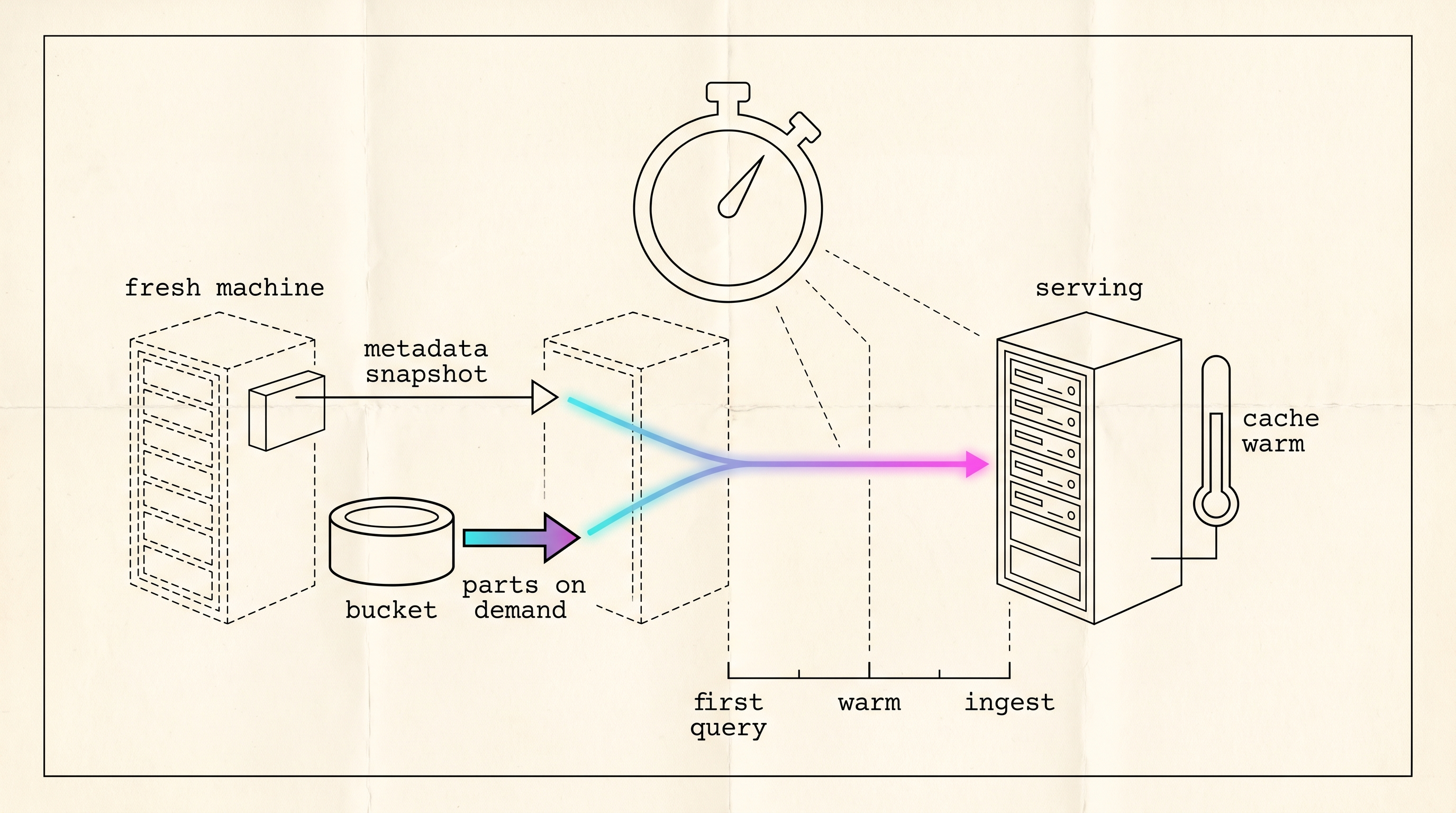
Our runbook for rebuilding the object-storage ClickHouse node needs three things: a fresh machine, a metadata snapshot of about a gigabyte, and access to the bucket. The commit message from the engineer who wrote the backup job estimates the rebuild at a few minutes. Nobody has timed it. We have lost a node before, and the recovery then was measured in days, so we won’t rely on an untested estimate.
In the drill, a machine that has never held the data gets the latest snapshot and a token that can read the bucket and nothing else, and we time every stage from the first command on that machine until it is serving production traffic at production speed. Until it has run, every number here is a fact about the design or a plain statement that we don’t have the measurement yet.
The node serves graph8’s intent pipeline: a visitor feed, crawled pages and a keyword resolver, with every data table on Cloudflare R2 behind a 2.5 TB NVMe cache, the part-to-object map on the local disk, a single-node Keeper, and Replicated table engines without a second replica. It is a 32-thread machine with two NVMe drives and a 1 Gbit port.
What the runbook says
A nightly job syncs three directories to a prefix in the same bucket: disks/s3_main, which maps each part to its objects, and store and metadata, which hold the table definitions. We keep fourteen days. The whole snapshot is about a gigabyte because it contains no table data.
The runbook’s recovery is four steps. Install ClickHouse on the fresh machine. Restore the three directories from the latest snapshot into /var/lib/clickhouse. Render the same storage configuration against the same bucket, with the same encryption key. Start the server. The tables should reappear, because their definitions are in metadata and their parts are on the map, and each part is fetched from the bucket the first time a query touches it.
The data itself sits in storage as files with meaningless names. The only thing that knows which files make up which table is a small index on the server, and that index is what the nightly backup saves. Rebuilding the server means putting the index back on a fresh machine that can reach the storage. The data never has to be copied.
What we expect to go wrong
We wrote this list before running the drill.
The snapshot doesn’t include the directory where SQL-created users live, so a restored node starts with the default user and nobody else, and every service fails at login. The fix, users rendered into configuration from the secret store, is item one of The Checklist and isn’t merged. The drill will either run on that branch or recreate the users by hand, and we’ll record how many minutes it costs either way.
The restored metadata files carry the real credentials, so a dictionary or a view whose source has a password comes back working. The trap is any object we have to recreate from SHOW CREATE output, say a dictionary whose source must change or a view whose definition has to change, because SHOW CREATE prints the password as the literal string [HIDDEN] and the recreated object fails on its first load. Those we recreate from the secret store and check in system.dictionaries, where status reads LOADED or FAILED and last_exception carries the error.
The encryption key is the failure we least want to meet. Every object in the bucket is ciphertext under a client-side AES-256 key. If the drill machine’s storage configuration doesn’t carry the same key, the server starts, the tables appear, and every read fails because the objects decrypt to noise.
Every data table uses a Replicated engine, and a Replicated table expects to find its paths in Keeper. The snapshot doesn’t include Keeper’s state yet, so the drill machine starts a fresh single-node Keeper with nothing in it and the tables come up read-only.
The cache on the drill machine is empty, so the first query over the largest table fetches every part it touches from a bucket an ocean away over a 1 Gbit port. We expect that cold scan to be the slowest of the timed stages.
Two ways out of read-only
ClickHouse documents SYSTEM RESTORE REPLICA for this situation. The SYSTEM statements page says it “Restores a replica if data is [possibly] present but Zookeeper metadata is lost” and that it “works only on readonly ReplicatedMergeTree tables”. It recreates the table’s Keeper paths from the parts on the local map, one table per statement. Parts that were committed before the loss get attached, and everything else goes to detached. The table stays Replicated, so a second replica can still join later.
The other way gives up replication. The ATTACH page documents ATTACH TABLE ... AS NOT REPLICATED, which brings a Replicated table back as a plain MergeTree table on one server, and the replication page says that when Keeper’s data is lost, the data can be saved by moving it to an unreplicated table. No Keeper is involved and the table is writable at once, but it can’t take a second replica until ATTACH TABLE ... AS REPLICATED and SYSTEM RESTORE REPLICA convert it back, since the attach itself doesn’t touch Keeper. We haven’t tried either direction.
We are adding a Keeper snapshot to every metadata snapshot, so a restored machine has its paths and needs neither statement. That change isn’t merged either. The drill runs against whatever backup exists on the day, and we record which path we took.
What we will time
We are timing the service, not the database. A server that answers SELECT 1 isn’t the node back. The node is back when the proxy sends it production traffic and the queries return at production speed.
The stages, in order, are: the machine provisioned and reachable; packages installed; the three directories restored from the snapshot; the storage configuration rendered against the bucket with the key in place; the first SELECT 1; the first count over the largest table, which is the cold scan; the first resolver query that answers within its warm band; the proxy repointed; the warm-band health check passing; and ingest resumed. For each stage we record the start, the end, the duration, and what, if anything, was waiting on a person.
None of those durations exist yet, and we won’t put estimates in their place.
The recovery point is set by the snapshot, which runs nightly today and is moving to every six hours. Parts written after the last snapshot are in the bucket but not on the restored map, and the feed loads them again because it keeps its own position.
Warming the node
A restored machine answers correctly and slowly. Its caches are empty, so every query pays for a trip to the bucket until the working set is on the local drive. Two statements shorten that period. SYSTEM PREWARM MARK CACHE “loads the marks of a table into the mark cache”, and SYSTEM PREWARM PRIMARY INDEX CACHE loads the primary indexes. Neither touches the column files. The drill runs both on the resolver tables and then replays production query shapes, so the parts those queries touch are on the local drive before the proxy sees the node.
The health check the proxy uses is the resolver’s daily scan with a time budget, and the node counts as up when it answers within the band it holds on the live node.
A rebuilt server gives correct answers from the first minute, but slowly, because every answer comes from storage until the server has pulled the data it uses most onto its own drive. Your team’s lists and triggers would work during that period and feel sluggish. We count the server as back only when it answers at the speed the live one does, so the clock in this drill keeps running through the slow period.
Checking the restored data
Row counts don’t prove a restore. A table that lost a part still returns a count, only lower, and one that attached a stale part returns a higher one. The check that works compares part fingerprints. system.parts carries hash_of_all_files, a sipHash128 of each part’s compressed files, and the set of active parts per table on the drill machine has to match the source, or differ by exactly the parts written after the snapshot. A merge on the source after the snapshot changes its set too, so compare partitions closed before the snapshot, or run SYSTEM STOP MERGES on the source table while you compare.
The read-only token
The drill machine holds a bucket token that can list and read and cannot write. The failure the drill must never cause is two machines with the same replica identity writing to one prefix, which a merge or a partition expiry on the drill machine would do. Merges on the drill machine will fail against the token, which is fine for a machine that exists only to be read. ClickHouse also checks disk access at start-up. The external disks page documents skip_access_check, false by default, as the switch that skips the check, and it doesn’t say what the check writes. We haven’t confirmed that ourselves, so the drill sets the switch and records whether it was needed.
What the drill decides
Four decisions are waiting on the numbers. Whether the fleet users go into the playbook now depends on how many minutes the users stage costs. The key stage, on a machine that never held the key, tells us whether escrow comes before the second copy of the data. Which Keeper path the drill takes decides whether Keeper gets a second node before the second replica does. And the cold scan decides whether the bucket moves to the right region before anything else.
Check it for yourself
The checks below tell you where a restored machine stands: which tables came up read-only, a fingerprint to compare between the source and the restored machine, and proof that the token can’t write. Run the first two on both machines as a user with SELECT on the system tables. The output shapes are illustrative, not from a run.
-- Tables waiting on a Keeper path
SELECT database, table, is_readonly, zookeeper_exception
FROM system.replicas WHERE is_readonly;

-- ┌─database─┬─table───────┬─is_readonly─┬─zookeeper_exception──────────────┐
-- │ intent   │ crawl_pages │           1 │ No metadata in ZooKeeper for ... │
-- └──────────┴─────────────┴─────────────┴──────────────────────────────────┘

-- One fingerprint per table from the hash of every active part's files
SELECT table, count() AS parts, sum(rows) AS rows,
       hex(sipHash128(arrayStringConcat(arraySort(groupArray(hash_of_all_files))))) AS fingerprint
FROM system.parts
WHERE active AND database = 'intent'
GROUP BY table ORDER BY table;

-- ┌─table───────┬─parts─┬──────rows─┬─fingerprint──────────────────────┐
-- │ crawl_pages │  1840 │ 246000000 │ 3A0C9E2F7B1D48A6C5E1F0B2D9A47C13 │
-- └─────────────┴───────┴───────────┴──────────────────────────────────┘
# The drill token must fail to write
aws --endpoint-url "$R2_ENDPOINT" s3api put-object \
--bucket <bucket> --key <data prefix>/drill-probe --body /dev/null
# An error occurred (AccessDenied) when calling the PutObject operationAny row from the first query is a table that still needs SYSTEM RESTORE REPLICA or an attach. If a fingerprint differs between source and restore on a table with no parts written since the snapshot, the restore isn’t complete. And if the put succeeds, the token could damage production.
Still open
How far the first run goes is undecided. The token covers every stage up to the health check, and the proxy repoint and the resumed ingest need the write token and the live node stopped first, so that only one machine owns the prefix. Nobody here has measured what a cold read costs from that bucket, and the cold scan stage is the first time anyone will. We haven’t decided whether to run the drill monthly on a machine rented for the hour and rewrite the runbook’s table each time. Running it once proves the runbook on one day, and running it monthly would catch the change that breaks it between runs.
Further reading
- SYSTEM statements, ClickHouse docs, for
SYSTEM RESTORE REPLICAand the two prewarm statements. - ATTACH, ClickHouse docs, for the plain MergeTree path.
- Data replication, ClickHouse docs, for recovery when Keeper’s data is lost.
- External disks for storing data, ClickHouse docs, for
skip_access_check. - Backup and restore, ClickHouse docs, for the native BACKUP behind the second copy and the advice to practise restores on a spare cluster.
Time the recovery before you depend on it.